Preview Hosting: Review Visual Diffs With the Actual App
Vizzly now hosts your app builds alongside visual diffs. Upload any static build (Storybook, Next.js, Vite, whatever) and reviewers see the real UI, not just screenshots. Here's why we built it and how it works.
A visual diff is a signal that something changed. It tells you what happened, but it doesn’t let you validate that the change is right. A screenshot is static. You can’t scroll it, click through it, or interact with the change in any meaningful way. To actually validate, you’d have to spin up your dev environment, run your tests, or track down a staging deploy just to see the page in context. That’s a lot of friction for what should be a quick review.
I wanted the validation step to live right next to the diff, inside Vizzly, without any of that overhead. So we built preview hosting.
The Review Experience
Preview hosting lets you upload any static build and view it right alongside your visual diffs, in the same dashboard, same review session. The hosted preview loads in an iframe next to the screenshot so you’re looking at the real, interactive page that was captured.
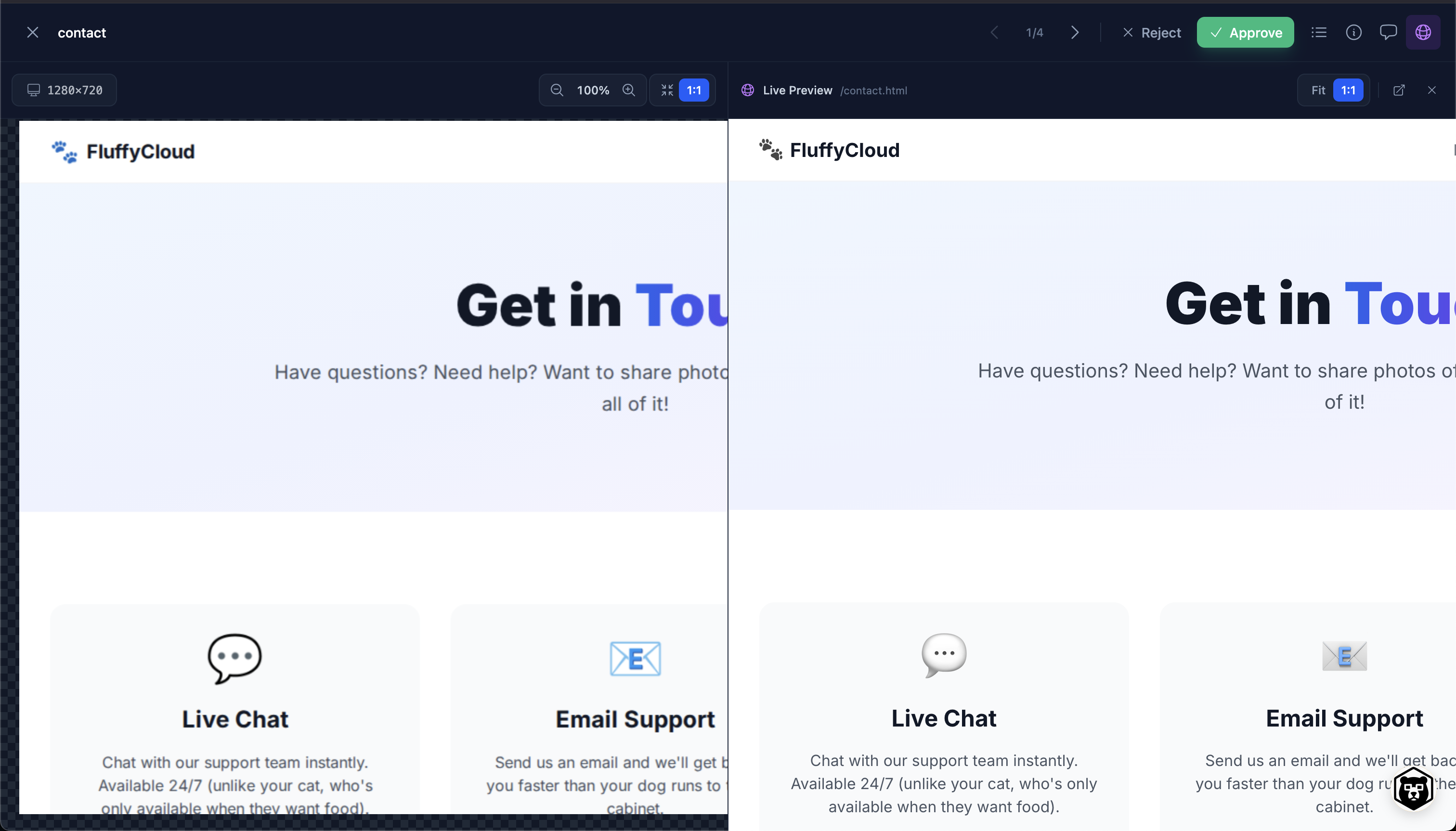
On the left, you’ve got the captured screenshot. On the right, the actual hosted app loaded in an iframe. You can scroll it, click around, hover over elements, check responsive behavior. There’s a “Live Preview” toggle in the toolbar to flip between the screenshot comparison and the interactive preview. It’s the difference between “this screenshot looks fine” and “I actually used the page and it works,” and that second one is what you want before hitting approve.
The CLI
The whole thing is driven by a single CLI command:
vizzly preview ./distIt uploads your build, ties it to the current Vizzly build, and the preview shows up in the dashboard. For local development, add --open to immediately launch the hosted version in your browser, which is handy for sharing a quick link or testing on a different device.
In CI, the CLI automatically ties the preview to the current build. Your pipeline stays clean:
npm run build
vizzly upload
vizzly preview ./dist
The preview is tied to a specific build, so reviewers always see the right version. No stale previews, no “wait, which branch is this?” confusion. When a teammate opens a screenshot to review, they toggle over to the live preview and interact with the actual page. If your CI environment doesn’t persist state between steps, you can pass the build ID explicitly with --build, but most setups won’t need to.
Any Static Build
Most preview hosting tools in this space are locked to a specific framework. Vizzly doesn’t care what generated your build. If your build process outputs a directory of static files, you can host it. That means a Next.js static export showing your full marketing site, a Storybook build for component-level review, a Vite app with real page layouts and routing, a documentation site you want to catch regressions on, or any static site generator like Astro or Gatsby. If your SPA can be served separately from your API, that works too.
Your build process already produces these artifacts. We just host them and put them next to your diffs.
Storage and Retention
Preview builds use content-addressed storage with deduplication. If two builds share the same assets (and they usually share most of them), we only store the unique files. This keeps storage usage reasonable even with frequent uploads.
Today’s runtime default is 7-day retention and a 100MB max preview upload. Plan-aware preview settings are being tracked separately, so don’t treat preview retention as the same thing as your normal build retention yet.
After retention expires, the preview is cleaned up automatically. The visual testing data (screenshots, diffs, comparisons) is retained separately under your plan’s normal retention policy.
Try It Out
If you’re already using Vizzly, add vizzly preview ./dist to your CI pipeline and you’re set. If you’re evaluating visual testing tools, this is one of those features that changes how your team reviews UI work. Want to see it in action? We use preview hosting on our Static Site SDK’s end-to-end test suite where you can browse a real build and see the split view for yourself.